
Finite Element Results Agent: Beam Sections and Principal Stress Review
01
Project Background
Interpreting profiles near supports.
Beam post-processing often asks which regions near a support warrant inspection, where a profile was sampled and whether principal-stress directions help explain a scalar field. A color plot alone rarely preserves these conditions, and switching result objects or filters can leave a report citing data from a different section.
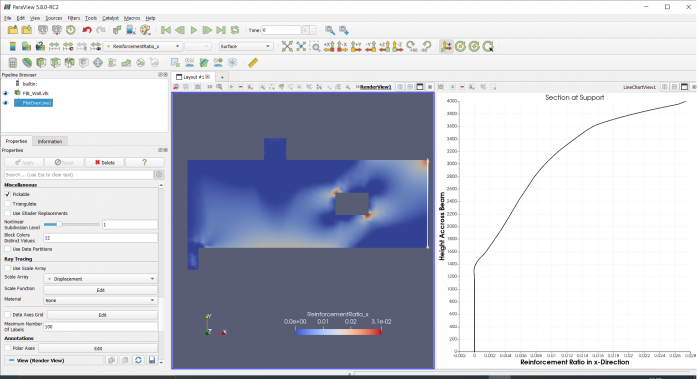
The analysis workflow covers exporting finite element results to VTK, importing them into ParaView, line sampling, integration and principal stress vector inspection. Small beam and wall examples can validate tool calls and result reproducibility.
02
Input Preparation
Check data before interpreting graphics.
Proposed integration collects authorized result files, load-case descriptions, coordinate and unit conventions, and post-processing state. A field register verifies the presence of displacement, reinforcement indicators and principal-stress vectors, including point or cell association. Without source arrays, only qualitative image interpretation is possible, not precise recalculation.
Each analysis fixes file identifiers, the selected object and sampling endpoints, retaining filter connections. The tutorial distinguishes saved state from saved data, so reproduction requires both result files and processing configuration. Customer identifiers, personal information and internal paths are removed before external transfer, with only necessary fields transmitted.
03
Tool Method
Cross-check section profiles and vectors.
The proposed agent first produces a reviewable query plan, then invokes line sampling and integration through bounded interfaces, recording fields, endpoints, output units and provenance. Converting a line integral to a section total requires confirmed thickness and dimensional reasoning; missing thickness leaves a per-unit-length result rather than importing example dimensions.
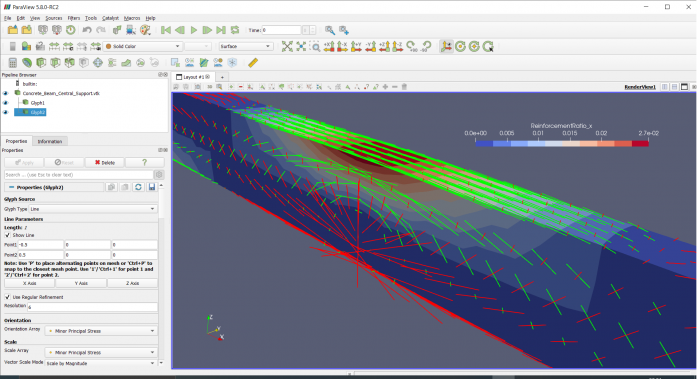
Principal-stress directions can be reviewed through the tutorial's Glyph workflow alongside scalar fields on the same object. AI explanations must cite returned data and state vector and deformation display scales. Magnification aids inspection but does not establish actual displacement magnitude or adequate structural capacity.
04
Anomaly Review
Integral signs and data associations.
The material warns that node ordering in a particular data transfer can produce negative volume integrals. The proposed workflow treats this as a review clue: inspect element orientation, conversion and integration targets, then compare against independent geometry. It must neither take absolute values indiscriminately nor assume the same issue exists in the current version.
For a pilot, an engineer manually reproduces one section and compares it with the controlled tool chain. Sampling scope, field association and units are checked before interpreting discrepancies. Empty fields, wrong objects, read failures or incomplete filters prevent conclusion generation and retain error records; previous curves cannot substitute for current results.
05
Acceptance Boundary
Interpretation is not structural approval.
Proposed acceptance evaluates reproducibility, correct evidence references and anomaly recognition, not report fluency alone. Mesh convergence, material models, loading and boundary conditions, and solver validity require separate review. Without them, the agent cannot infer structural safety or service performance from post-processing graphics.
Implementation first wraps sampling, integration and field-data queries as controlled tools, then integrates them into the AI query workflow. Engineers review reinforcement ratios, field distributions and principal stress directions; structural design decisions still follow the full calculation and verification process.
06
Implementation Outcomes
The method is expected to make repeated section location, field checks and report references replayable, allowing engineers to focus on anomalies and physical interpretation. Expected benefits come from consistent data and processing records, not replacing finite element solvers with a language model.
Compare manual and assisted analysis on the same dataset for repeatability, field-reference errors and review time. Track anomalies and their resolution to assess practical value.